Quick Answer
Seedance 2.5 Flash is coming soon to Video Creation at the top of Hilight’s AI Studio. BytePlus positions it close to flagship Seedance 2.5 quality, with nearly twice the generation speed and approximately 34% lower provider pricing for 720p text-to-video and image-to-video. It also supports up to 30-second generation, multimodal references and video editing, making it worth considering for creative work that involves several attempts.
The first version of a video often leaves another idea worth trying. A different entrance, a closer camera, warmer light or a change of pace might make the scene work better. Each attempt takes time and costs money, which can make “good enough” an attractive stopping point.
Seedance 2.5 Flash lowers the threshold for another attempt. You can explore several openings, adjust an action and compare the versions you want to keep. Its speed, pricing and generation capabilities explain which tasks deserve a try.
What Is Seedance 2.5 Flash?
Seedance 2.5 Flash is a separate video-generation model in ByteDance’s Seedance 2.5 family. It targets more frequent creation, pairing a near-flagship quality position with faster generation and a lower per-generation price.
The official BytePlus announcement identifies three main benefits: results close to the flagship, nearly twice the generation speed, and an approximately 34% price reduction for 720p text-to-video and image-to-video. The comparison is with Seedance 2.5. These are provider API prices; Hilight’s credit rules will be announced at launch.
Flash supports text-to-video, first-frame and first-and-last-frame generation, multimodal references, video editing and extension. Those tasks appear in the ModelArk release notes. A still image can become the starting point for a shot, while an existing clip can become the basis for an edit.
Seedance 2.5 Flash vs the Standard Model
1. Faster generation makes another version easier to explore
BytePlus reports nearly twice the generation speed. That is especially relevant to a repeated creative process: generate a version, judge the action and composition, then revise the prompt. A shorter cycle makes it easier to compare directions within one working session.
For a compact camera reveal, you might explore a studio setup, a traveler taking the camera from a bag, and handheld shooting on a night street. Each communicates a different idea. Seeing them can make the choice easier than comparing written descriptions. The announced speed describes model generation; product wait time also depends on duration, references and queueing.
2. Lower generation cost leaves more budget for alternatives
BytePlus announced USD 0.152 per second for 720p text-to-video and image-to-video, approximately 34% below Seedance 2.5. Applied to otherwise comparable work, that announced reduction takes a normalized generation cost of 100 down to about 66.
If your task involves several openings, camera moves or moods, the difference can fund additional versions. You could keep the camera product and clip length fixed while comparing a bright studio setting with a nighttime treatment. The useful question is which alternatives deserve that extra attempt.
3. Near-flagship positioning comes with specification differences
“Close to Seedance 2.5” is the provider’s quality positioning, rather than a promise of identical results in every scene. The standard model retains higher resolution and a larger reference allowance, which matter for different scales of production.
Specifications: the official series tutorial and video-generation API documentation. Speed and price are provider-announced comparisons.
Flash is a reasonable first option for exploring ideas and creating shots when 720p fits the intended use. Choose the standard model when 1080p delivery or more references are required. Standard Seedance’s Draft mode is a dedicated preview-to-final feature, distinct from using Flash to explore ideas. Our Seedance 2.5 introduction provides the family background.
Which Video Tasks Fit Flash?
Up to 30 seconds gives an action room to develop
A generation lasting up to 30 seconds can accommodate an opening, an action and a deliberate ending. You can establish the setting, move closer to the subject and finish on a composition that holds. Compared with a very short fragment, there is more time to arrange a progression within one generation.
A compact-camera sequence might begin with a backpack opening, continue as someone takes out the camera and raises it to shoot, then finish on a product close-up against a night scene. Describe the order and approximate timing. Extra duration gives the idea room, while a clear sequence gives it pace.
Multimodal references give appearance, movement and sound separate inputs
Multimodal referencing means images, video and audio can inform the same generation. A product photo can define appearance, a clip can suggest movement or camerawork, and audio can supply a sound or rhythm reference. You can show part of the intention instead of describing every detail in prose.
The official prompt guide discusses subject, motion, style, audio and storyboard references. Each answers a different question: what the subject is, how it is filmed, or what it sounds like. Explain each asset’s role when combining them.
Flash accepts up to 10 images, 5 video clips and 5 audio clips. For one product shot, that allows multiple views alongside creative references. When the scene needs a surface, connector or material detail, our product close-up guide can help you choose what deserves the camera’s attention.
Editing lets an existing clip become the next starting point
Flash supports editing and extending existing video. That is useful when an initial result is close to the idea, but one element needs changing. You might keep the main subject and action while adjusting the setting, or develop the content before or after an existing clip.
The clip being edited constrains the output’s aspect ratio and duration. An ordinary reference clip mainly supplies creative or motion information. “Change this clip’s background” and “use this clip’s camera movement” describe different tasks. The verb helps determine how the model uses the input.
How to Describe the Shot and Its References
A useful first experiment is one product with two different entrances. Prepare a clear product photo, generate an image-guided shot, then change one creative element. Adapt this prompt in a mode that accepts image references:
“Create a 12-second compact-camera showcase for people who enjoy city travel photography. Use the product reference for the camera’s appearance. Preserve its body shape, lens position, button layout and color. From 0–3 seconds, the camera rests on a charcoal surface as soft side light reveals it. From 3–8 seconds, slowly push in from a three-quarter view to show the surface finish and lens detail. From 8–12 seconds, hold a close-up with the entire camera visible and a simple background. Use realistic studio photography and subtle ambient sound. Add no text or other products.”
For a second version, replace the charcoal surface and side lighting with a wooden table and morning window light in a traveler’s accommodation. Keep the product requirements, timing and action order. You can compare one creative change without turning every attempt into a different brief.
If you add a video reference, state what it controls: “Use the clip only for the speed of the camera move; use the image for product appearance.” Review whether the body, buttons and lens remain consistent during movement, then decide whether the mood works.
Where Will Flash Fit in Hilight?
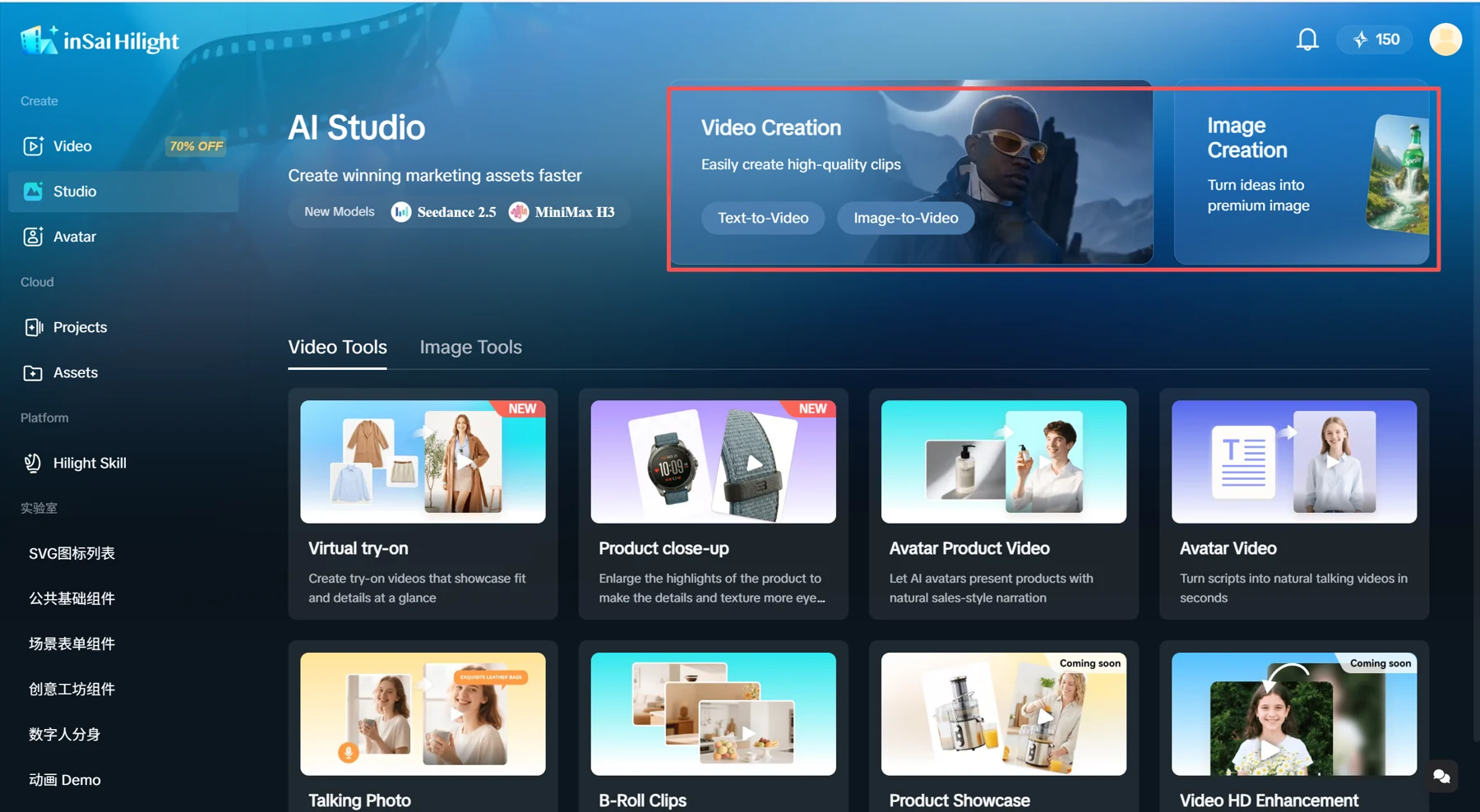
Seedance 2.5 Flash is coming soon to Video Creation at the top of AI Studio, labeled 视频快创 in Chinese. This entry fits a visual idea you want to explore directly as a shot or video asset. The AI Studio overview introduces the creation area.
Once the model becomes available, open the top video entry, select Flash and start with the modes and settings provided there. Hilight’s initial configuration and credit cost will be confirmed at launch. Provider API prices do not directly translate into Hilight credit prices.
Pick a shot you actually need, a product reference and two directions you would like to compare. When Flash arrives, that focused experiment will make it easier to judge its fit than beginning with a complicated film.
Frequently Asked Questions
It fits work that prioritizes generation speed and per-generation cost, with 720p sufficient for the use. Choose the standard model when you require 1080p, more references or its dedicated Draft feature.
Official Sources

