Quick Answer
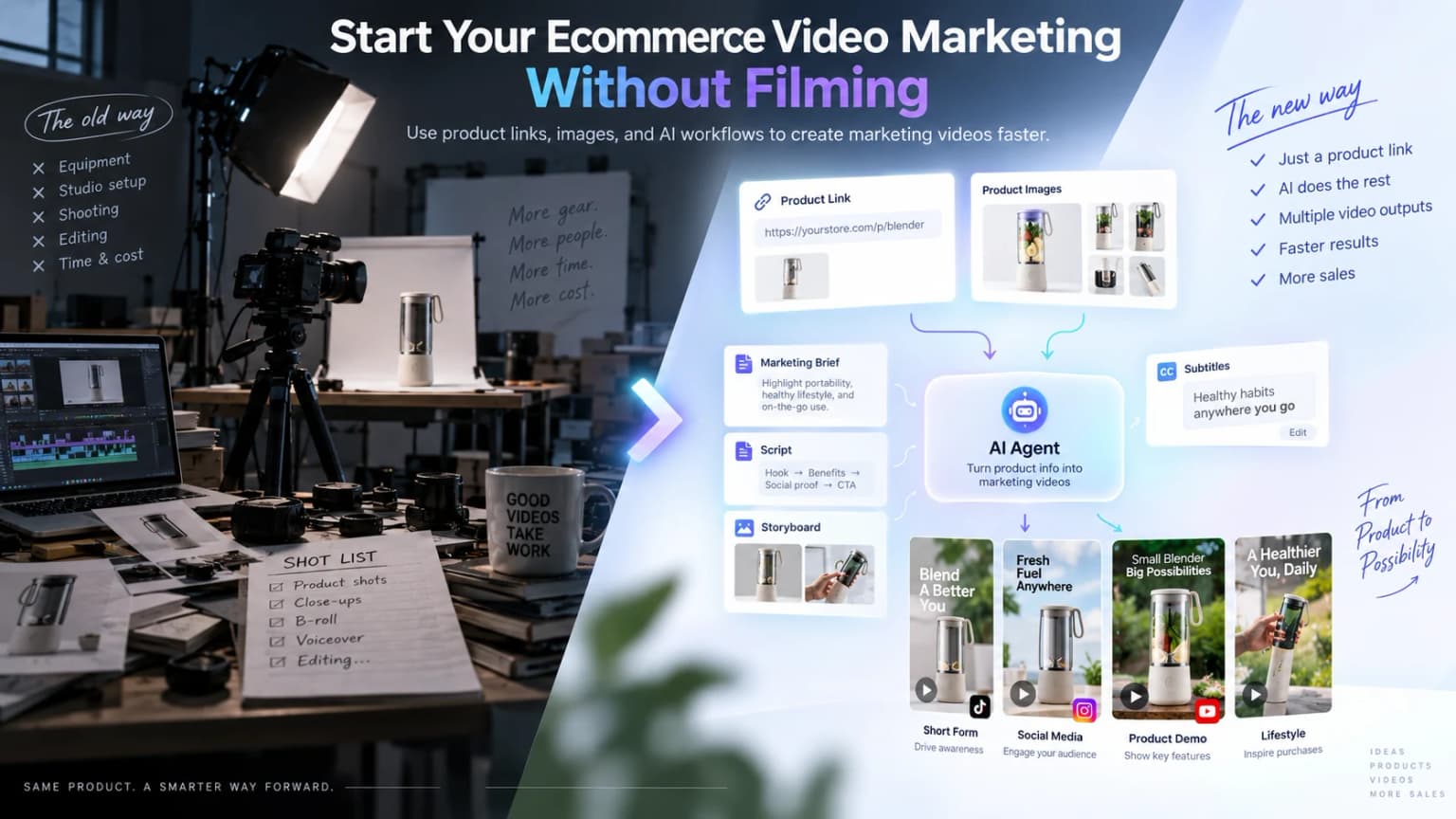
Traditionally, making a marketing video for one product meant gathering footage, writing a script, arranging a shoot, and editing everything together—or hiring people to do it. Much of the time and commitment came before you could see whether the idea worked.
An AI marketing video Agent changes the starting point. An ecommerce seller can begin with a product link, product images, and a simple marketing goal. A product-aware system can then help develop the message, script, storyboard, visuals, voice, captions, music, and complete video.
The biggest change is not simply faster video generation. Ecommerce brands can now start video marketing before they build a traditional production setup. The first decision becomes what the video should communicate—not how to assemble a film crew.
Why Ecommerce Video Marketing Used to Be Hard to Start
A product can be ready to sell while its first video is still weeks away. The delay usually begins with a choice between two production paths, and both demand more than a good product idea.
You hire a third-party production team
The brand first explains the product, target market, and campaign goal to an agency or video team. Then come the brief, reference collection, sample delivery, script review, filming, first cut, revisions, and final delivery.
The real burden is the length of that chain. Every new creative direction can bring another round of briefing, production, and review. For a cross-border seller, the work grows again when the message changes by market, language, platform, aspect ratio, or content style.
Outsourcing solves the skills problem, but it does not remove the coordination problem. The seller still has to translate product knowledge into instructions a production team can execute.
You make the video yourself
Skipping the agency does not remove the work. It transfers the work to the seller:
Creative idea → Script → Shot list → Shooting → Voiceover → Subtitles → Editing → Export
A seller may only want to test a new product ad. By the end of the afternoon, they are acting as marketer, copywriter, director, camera operator, voice talent, and editor.
That is why ecommerce video marketing often feels hard to start. The first test already asks for a small production operation.
Before You Could Make a Video, You Had to Prepare a Lot of Assets
Traditional production works best when the raw material already exists. The script can call for a product close-up because someone can shoot it. The editor can build a lifestyle sequence because the brand has footage of the product in use.
In practice, the expected asset list can quickly grow:
- Product footage from multiple angles
- Close-ups of important details
- Real-world use scenes
- Presenter or model footage
- Lifestyle B-roll
- Brand graphics and music
- A voiceover recording
- A shot list that connects everything
Many ecommerce sellers start looking for a marketing video precisely because they do not have that library. What they have is much simpler: a product link, a set of product photos, a description, and several selling points.
You need video assets to start video marketing—but creating those assets is already a video production project.
This is the preparation paradox. A useful ecommerce video may need far more visual variety than the product page provides, yet arranging that variety is the very job the seller hoped the video tool would make easier.
Product photos can still be valuable source material. If the immediate need is to create individual motion clips, close-ups, or reusable visual assets rather than a complete marketing video, an image-to-video AI workflow is the more focused path.
AI Changes Where Video Production Starts
Traditional production usually follows this sequence:
Assets → Production → Video
A marketing-oriented AI workflow can begin earlier:
Product information → Marketing intent → AI creation → Video
That shift separates a marketing video system from a general text-to-video model.
A general video generator is useful when you already know the shot you want. It may ask for a prompt such as “a portable blender on a gym bench, slow camera push-in.” The user supplies the visual decision.
Ecommerce marketing begins one level higher. The seller may only know the product, the audience, and the outcome they want. They still need answers to questions such as:
- Product: What is being sold, and which details must remain accurate?
- Audience: Who should recognize the problem or desire in the opening?
- Message: Which selling point deserves the main role?
- Purpose: Is the video meant to introduce, explain, compare, or convert?
- Structure: Which scenes make that message easy to understand?
A marketing-focused AI product helps work through those questions before generating isolated shots. It connects product understanding with the creative direction, script, storyboard, assets, sound, and final composition.
In this broader product to video workflow, the input is not only an image waiting to be animated. It is a product that needs a clear reason to appear in someone’s feed, ad, or shopping journey.
That is also the idea behind inSai Hilight as an ecommerce creative video platform. The goal is not to turn a sentence into a disconnected clip. It is to move from product context and marketing intent toward a complete marketing video.
Start With What You Already Have
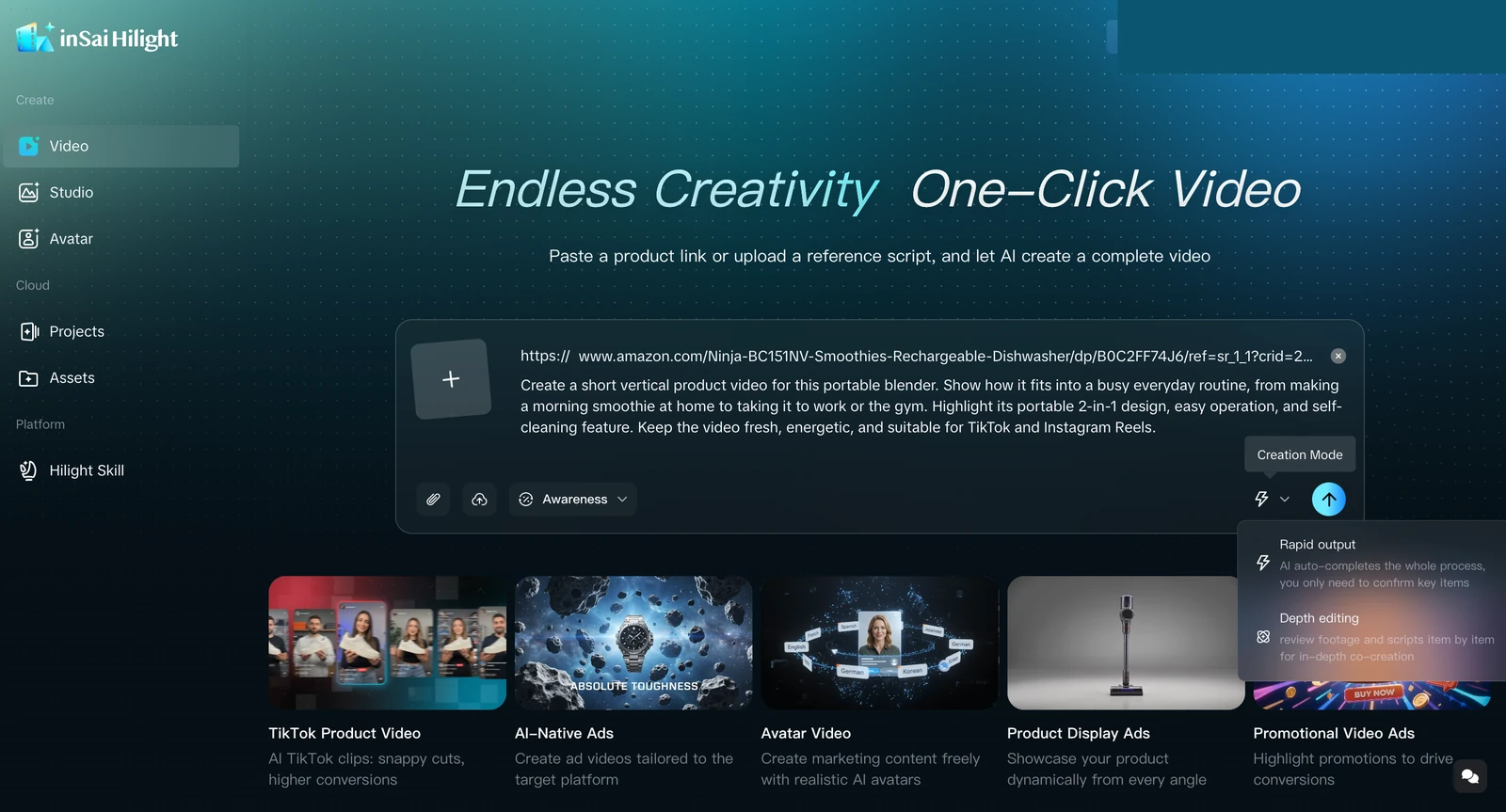
Hilight Smart Video is designed for the moment when the product exists but the production package does not. You can begin from one or more familiar inputs.
A product link
A supported product-detail link can provide product names, descriptions, and images. It gives the system product context without asking the seller to rewrite the entire page as a production document.
When the URL is the main starting point, the product-link-to-video guide shows how product-page information can support hooks, selling points, scripts, scenes, and a complete video.
Product images
Main images, detail photos, and multi-angle shots help establish what the product should look like. They can anchor generated visuals while a short written request explains the intended use.
A marketing idea
The request can be as direct as:
Example request: “Promote this portable blender to people who go to the gym. Focus on portability, quick preparation, and an energetic everyday routine.”
It does not need to describe every shot. Smart Video can use the product context and creative request to continue through product understanding, selling-point development, script and storyboard planning, visual production, voice and caption treatment, music, and final composition.
The input screen brings the product link and marketing request into the same task. A seller can focus on what the video should achieve instead of writing camera directions for every second.
The result is a complete video that can be reviewed alongside its storyboard descriptions. It turns an abstract idea into something concrete enough to judge, duplicate, download, or adapt.
Less Preparation Does Not Mean Less Marketing Thinking
AI can compress production preparation. It cannot decide what a brand should stand for or whether a claim is true.
The useful trade is to spend less attention on arranging the shoot and more attention on decisions that shape the message:
- Audience: Who should immediately recognize that this product is for them?
- Selling point: What is the one buying reason the video must make clear?
- Objective: Is this version building awareness, explaining a feature, or asking for action?
- Evidence: What must viewers see for the message to feel credible?
- Channel: Where will the video run, and how should that affect its pace and shape?
For the portable blender example, “make it energetic” is a production cue. “Show how it fits a gym routine for someone who does not want to carry a full-size blender” is a marketing decision. The second gives the video a reason to exist.
The seller also remains responsible for product accuracy, usage rights, and claim review. Generated footage can illustrate a use case, but it should not invent product performance. A waterproof claim, battery duration, weight capacity, or before-and-after result still needs factual support.
The more clearly those decisions are expressed, the more useful the AI workflow becomes.
Less production preparation. More room for marketing decisions.
One Product Does Not Have to Mean One Marketing Video
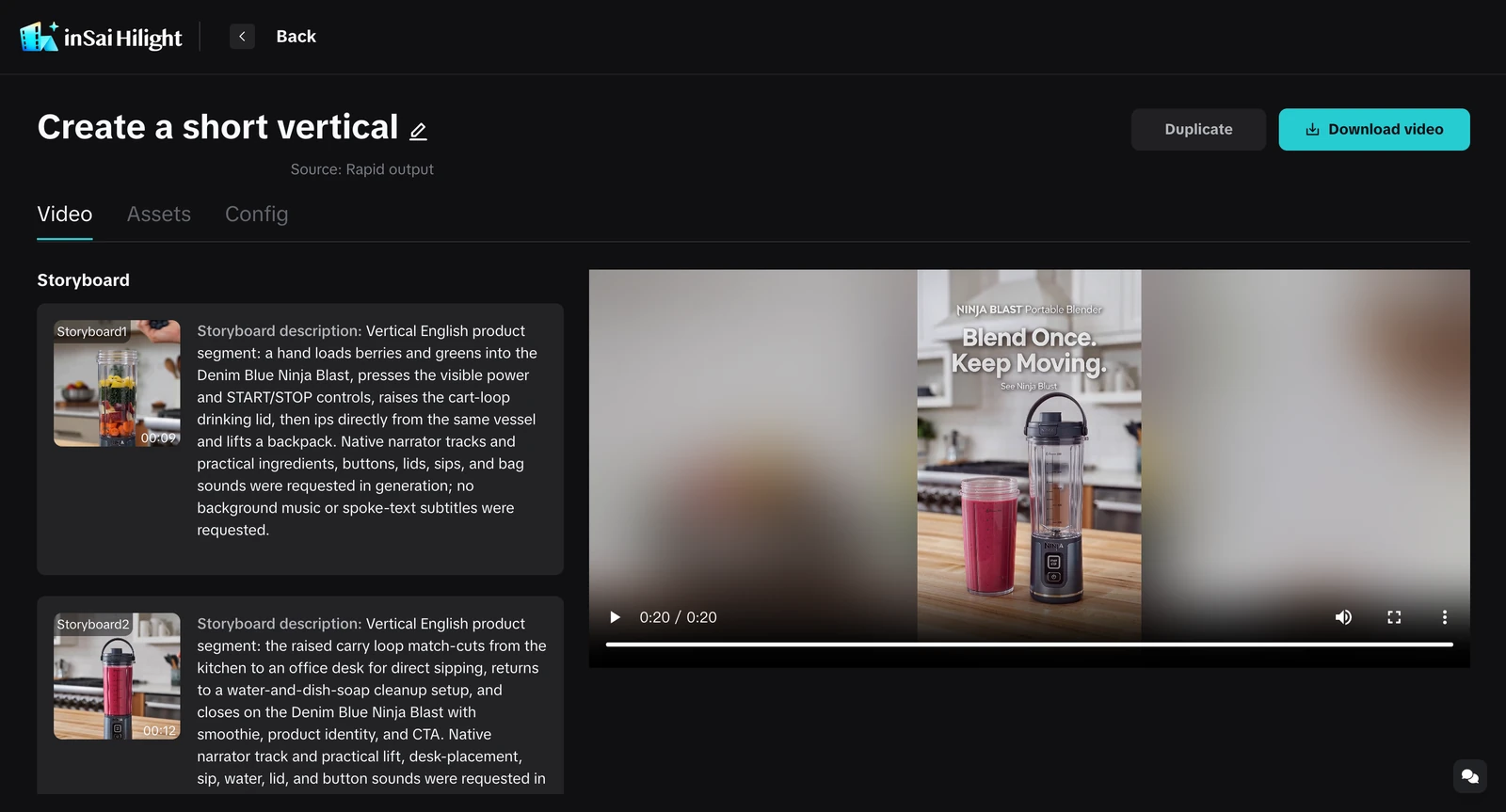
A traditional shoot often pushes a brand toward one master video because each additional concept may require new scenes, talent, or editing time. An AI workflow makes it easier to treat the first complete video as a starting point for variation.
That does not mean pressing one button to publish everywhere. Different placements still need deliberate choices.
In Smart Video, the finished project can be duplicated to create another version. Platform, language, aspect ratio, duration, and creative direction can then be adjusted around the next marketing need. The important point is control: one product can support several intentional versions without treating each idea as a brand-new shoot.
The first version does not have to carry every selling point or satisfy every channel. It only needs a clear audience, one strong message, and a placement in mind. Once that direction is visible, the next version can test a different answer.
That is the larger opportunity for ecommerce video marketing. AI does more than shorten production. It lets more marketing ideas reach the point where a seller can actually see, compare, and improve them.
A useful product-to-video process begins before the first shot and continues until the marketing idea becomes a complete video.
Frequently Asked Questions
When should an ecommerce brand still film real product footage?
Use real footage when the video must prove physical performance, show a regulated or safety-sensitive action, document a result, or capture a product detail that generated imagery cannot reproduce faithfully. AI can reduce the amount of new footage you need without turning factual proof into a synthetic claim.
What should the first marketing request include?
Name the product, the intended audience, one main selling point, the purpose of the video, and its destination. A concise request with those five decisions is more useful than a long prompt filled with camera effects but no marketing direction.
Can the same product video simply be resized for every platform?
Resizing solves only the frame. A useful platform version may also need a different opening, pace, caption density, product emphasis, duration, or CTA. Duplicate the project, keep the product facts consistent, and change the creative decisions that belong to the new placement.

