Quick Answer
If you already have a product link, product images, or existing clips, you have enough to start creating Facebook video ads. You do not need to arrive with the hook, customer scenario, complete script, and CTA already written.
Hilight's intelligent AI marketing Agent continues from those product assets. It identifies a selling-point angle, develops the hook and customer scenario, decides how the product can prove the message, and creates the script and CTA. The same direction then moves into ad-asset production, post-production, and a finished video.
Product Assets Are Not Yet a Facebook Video Ad
An ecommerce brand may already have a full library of product content: a product page, packshots, detail images, model photography, lifestyle photos, and clips from an earlier shoot. Those assets can show what the product is. They do not yet decide why someone should keep watching an ad.
That missing decision is the creative direction.
One product can support many messages, but one video needs a focused reason to care. Which benefit deserves the opening? What customer situation makes the value immediately recognizable? Which product detail or action can prove the claim on screen? These choices turn product information into an ad with a clear persuasive logic.
Traditionally, that work is split across strategy, copywriting, scripting, production, and editing. A seller with usable assets may still be waiting for an executable idea. Once the idea exists, another handoff is required to translate it into shots and a finished video.
Hilight Turns Product Information Into an Ad Direction
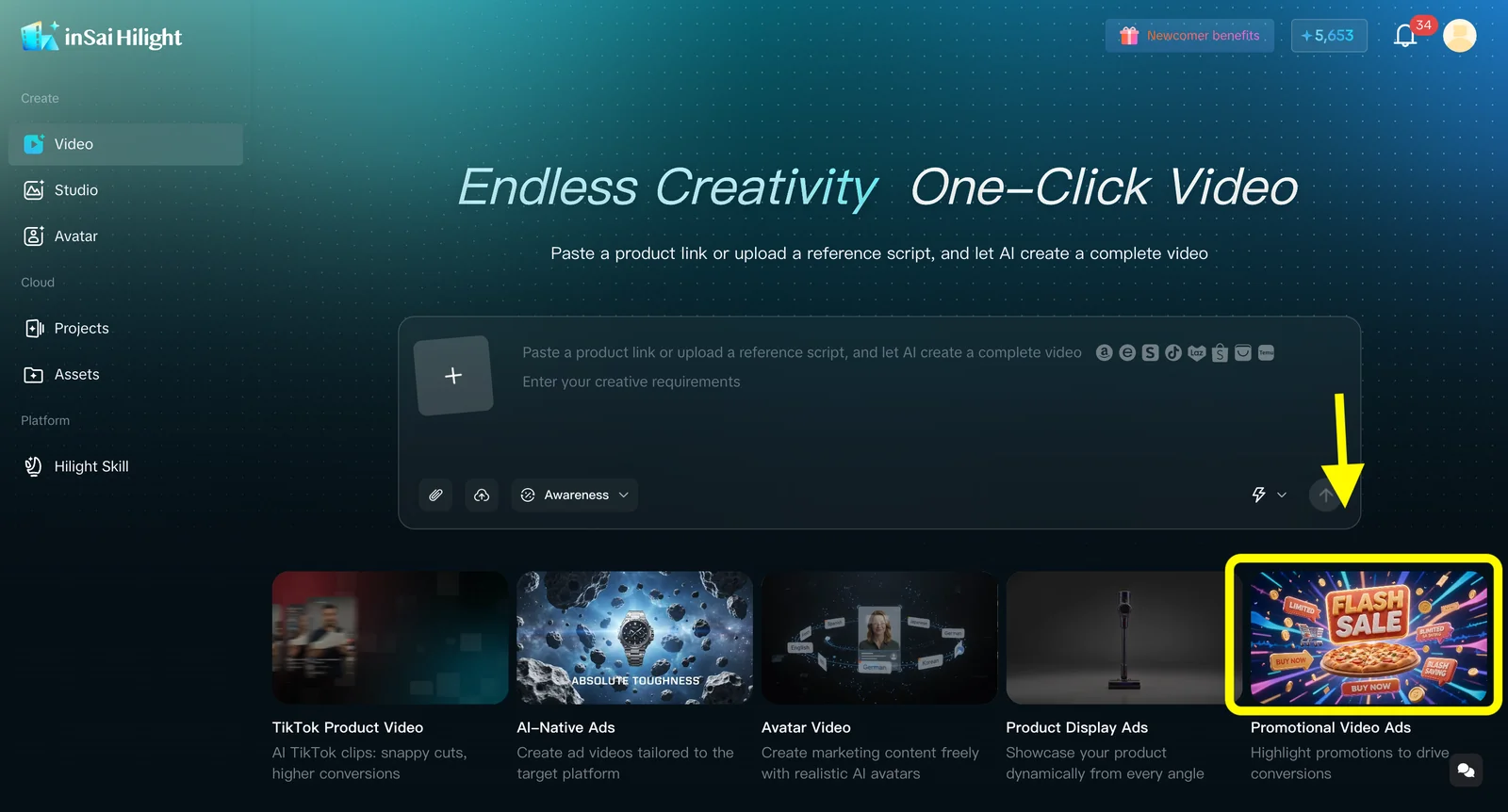
Hilight Smart Video is an Agent-powered workflow for marketing-video production. A task can begin with an accessible product link, product images, existing clips, a reference script, or a short creative request.
Once that information enters the task, the Agent does more than arrange images on a timeline. It understands the product, fills in the information needed for the current brief, and organizes scattered product facts into a direction that can be produced.
This means the seller does not need to complete all the marketing thinking elsewhere and use Hilight only as the last production tool. The seller provides a reliable product subject, usable source assets, and the constraints that matter. Creative development is part of the Agent's work.
If a product page is your main source, see how it can become the starting point in Hilight's link-to-video guide.
Creative Direction Continues Into the Finished Video
For an ecommerce ad, a hook or script is not the final deliverable. The idea has to become specific shots. Product actions need to support what the voiceover or captions promise. Pacing, audio, on-screen text, and the CTA all need to express the same direction.
Hilight keeps that work inside one coordinated Agent process. After product understanding, the workflow continues through key-information completion, creative and ad-asset production, post-production, and final delivery. The creative direction does not have to be rewritten each time it moves between people or tools; it remains the production context for the video.
For ecommerce sellers, that distinction is practical. Product images are not simply dropped into a template. They help the Agent understand the item, choose what to emphasize, design the on-screen proof, and carry the idea through to a complete video.
From Jacket Assets to Storyboard, Script, and Complete Video
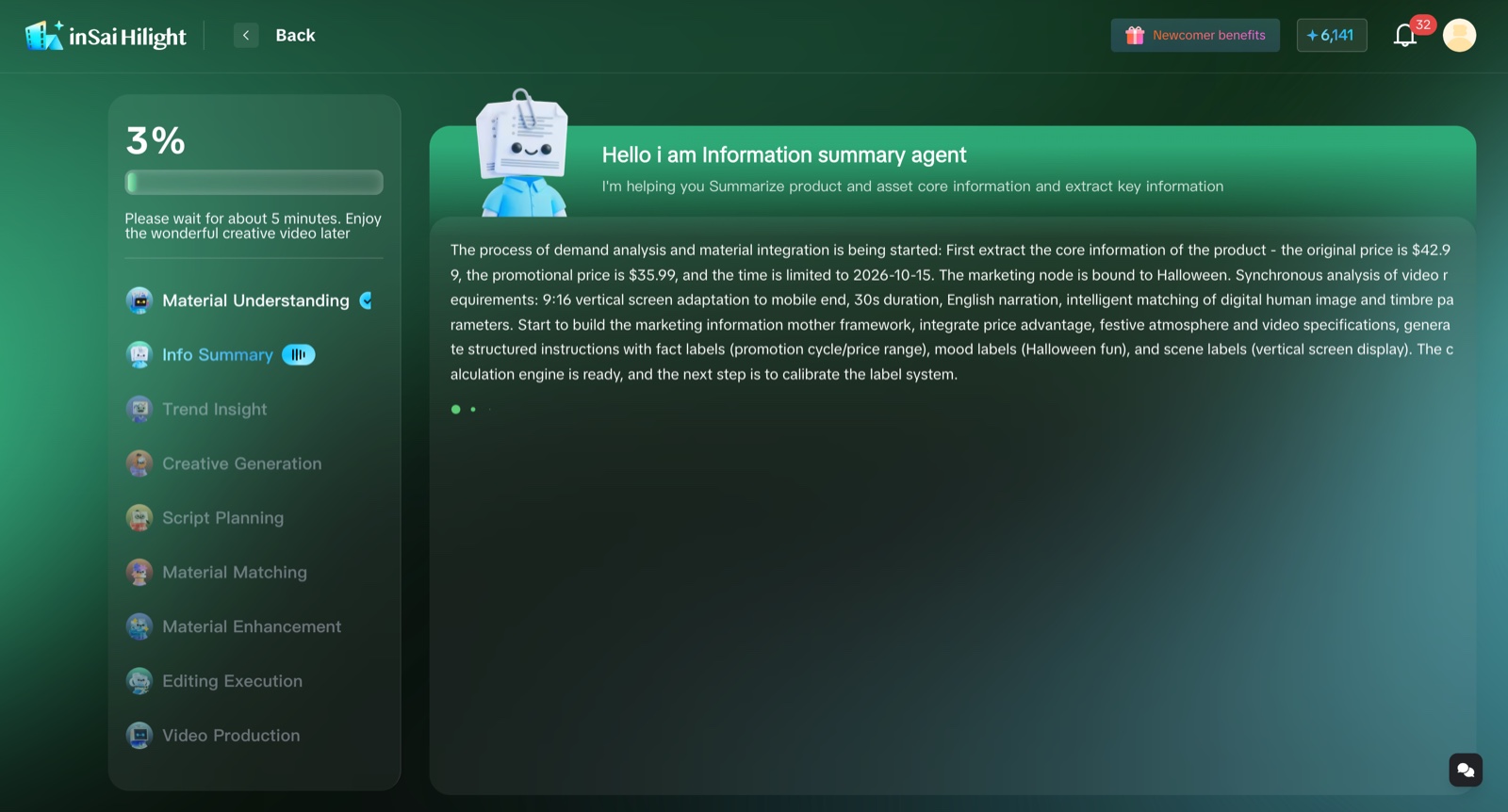
A real jacket-promotion project makes this Agent workflow more concrete. The task began with product information and several jacket images. It also included the promotional price and timing, a seasonal Halloween marketing moment, a 9:16 frame, a 30-second duration, and English voiceover.
The generation view brings material understanding, information summary, trend insight, creative generation, script planning, asset matching and enhancement, editing, and video production into one visible process. This is more than a generic loading state: it shows the marketing and production work the Agent coordinates between the source assets and the result.
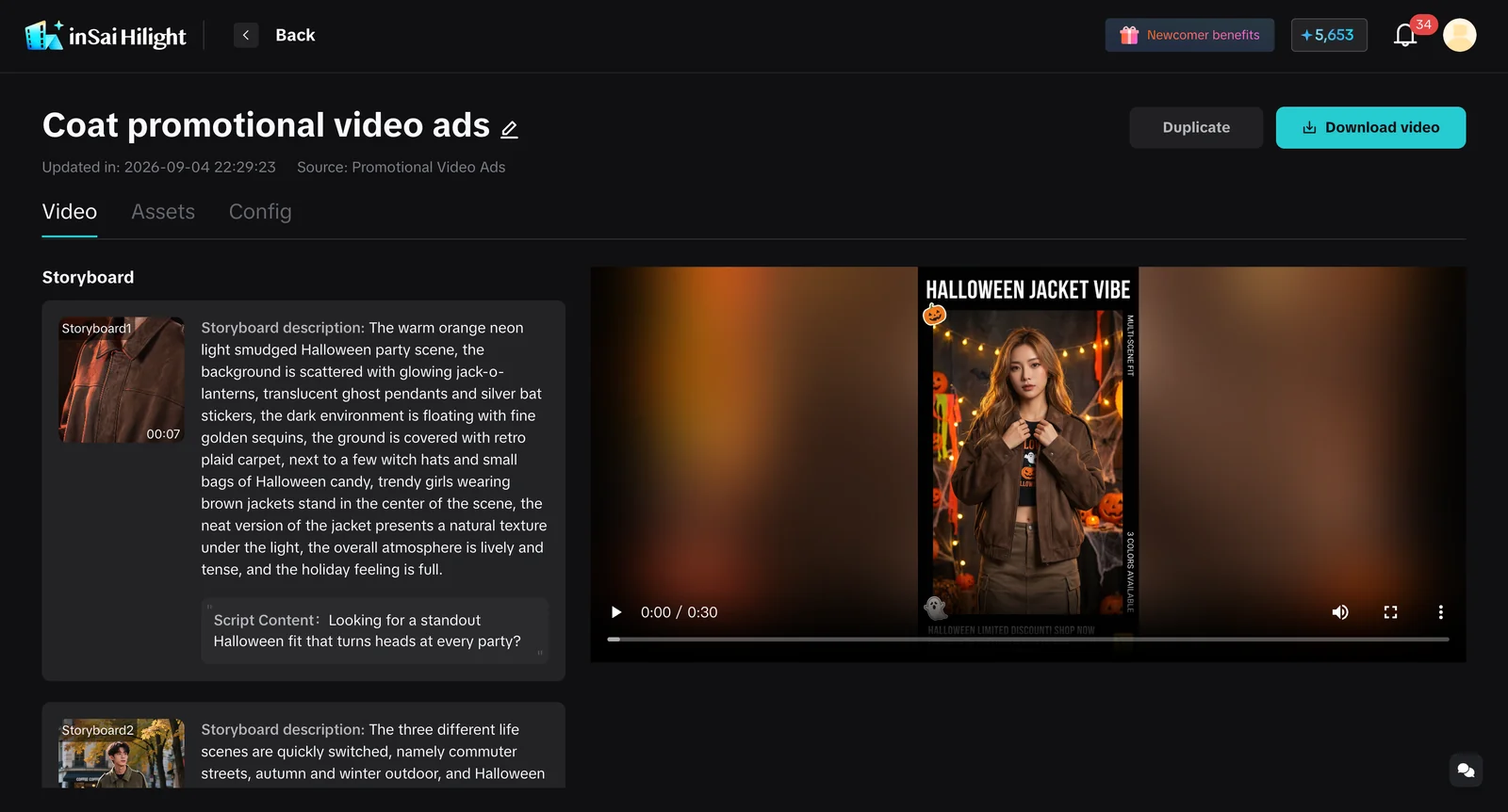
On the project result page, the left side contains the storyboard, shot descriptions, and script content. The right side shows the completed vertical jacket-promotion video. The opening builds around an attention-getting outfit for a Halloween party. Later scenes connect the jacket's styling to commuting, autumn and winter outdoor use, and a seasonal gathering.
The deliverable is therefore not a loose set of product images or an isolated script. Product information, the seasonal moment, creative direction, storyboard, and copy all arrive in one complete video.
This project demonstrates how Hilight moves from product assets through creative planning to finished production. It is not presented as a Facebook campaign report, and it does not establish views, conversions, sales, or advertising performance. The Facebook-specific viewing context is a separate task constraint.
The Facebook Context Shapes How the Idea Appears
Setting Facebook as the intended context is not a matter of adding the platform name to the copy. When a seller specifies Feed or Reels, aspect ratio, language, and market, those constraints affect how the creative direction enters the frame.
Reels, for example, is a vertical, full-screen, continuously viewed environment. Meta's official Reels ads guidance recommends 9:16 video with audio and advises keeping important elements within the safe zone. That context affects the opening action, product position, caption density, use of sound, and timing of the CTA.
In Feed, the product and scenario need to be recognizable while someone moves through a mixed stream of content. In Reels, the direction needs to account for vertical motion and safe-zone composition from the opening frame. The Agent is not receiving an abstract request to “make a video.” It is receiving an ad task for a particular viewing environment.
Quick Creation and Deep Co-Creation Offer Different Levels of Involvement
Smart Video currently offers Quick Creation and Deep Co-Creation. Both are Agent-powered; the difference is how closely the seller wants to participate in the task.
Quick Creation fits situations where the goal is to get a complete first version with fewer decisions. Deep Co-Creation fits work that requires more involvement in creative direction, brand expression, or content details.
That choice does not transfer the entire creative responsibility back to the seller. It creates a clearer participation boundary: let the Agent develop a complete direction sooner, or bring important brand and content requirements into a deeper collaboration.
For a broader look at how ecommerce assets can support different marketing-video scenarios, read Hilight's AI product ads guide for ecommerce.
From Product Assets to Facebook Video Ads, It Is One Agent Task
When creative planning and finished-video production belong to the same workflow, product assets take on a larger role. They are not only visuals that may appear in the edit. They are the evidence the Agent uses to understand the product, select the message, establish a customer scenario, and arrange product proof.
That is the practical role of Hilight's intelligent AI marketing Agent in Facebook video ads: it begins before the creative has been completed, develops the direction from product information, and carries that direction into the finished video.
Frequently Asked Questions
Can I start with product images but no ad script?
Yes. Smart Video can begin with product images, an accessible product link, existing clips, a reference script, or a short creative request. Each input helps the Agent understand the product, confirm its appearance, or constrain the direction. You do not need every item before the task can begin.
Does Hilight only output creative ideas?
No. Smart Video continues from product understanding and creative production into ad-asset production, post-production, and final video delivery. The creative direction is one part of the marketing-video workflow, not the only output.
Can I specify a Facebook placement, language, or brand style?
Yes. If placement, aspect ratio, language and market, duration, key selling point, audience, or visual style matters, include it in the initial request. Deep Co-Creation is suitable when you want more involvement in creative direction, brand requirements, or content details.
Does Hilight publish the finished video directly to Facebook?
Smart Video produces the marketing video. Facebook account setup, asset upload, ad review, publishing, and campaign management remain in the relevant Meta tools.

