Best AI Video Ad Generators for Ecommerce Teams in 2026
A practical comparison of HiLight, Topview, Creatify, JoggAI, and HeyGen based on the work ecommerce teams actually need to complete.
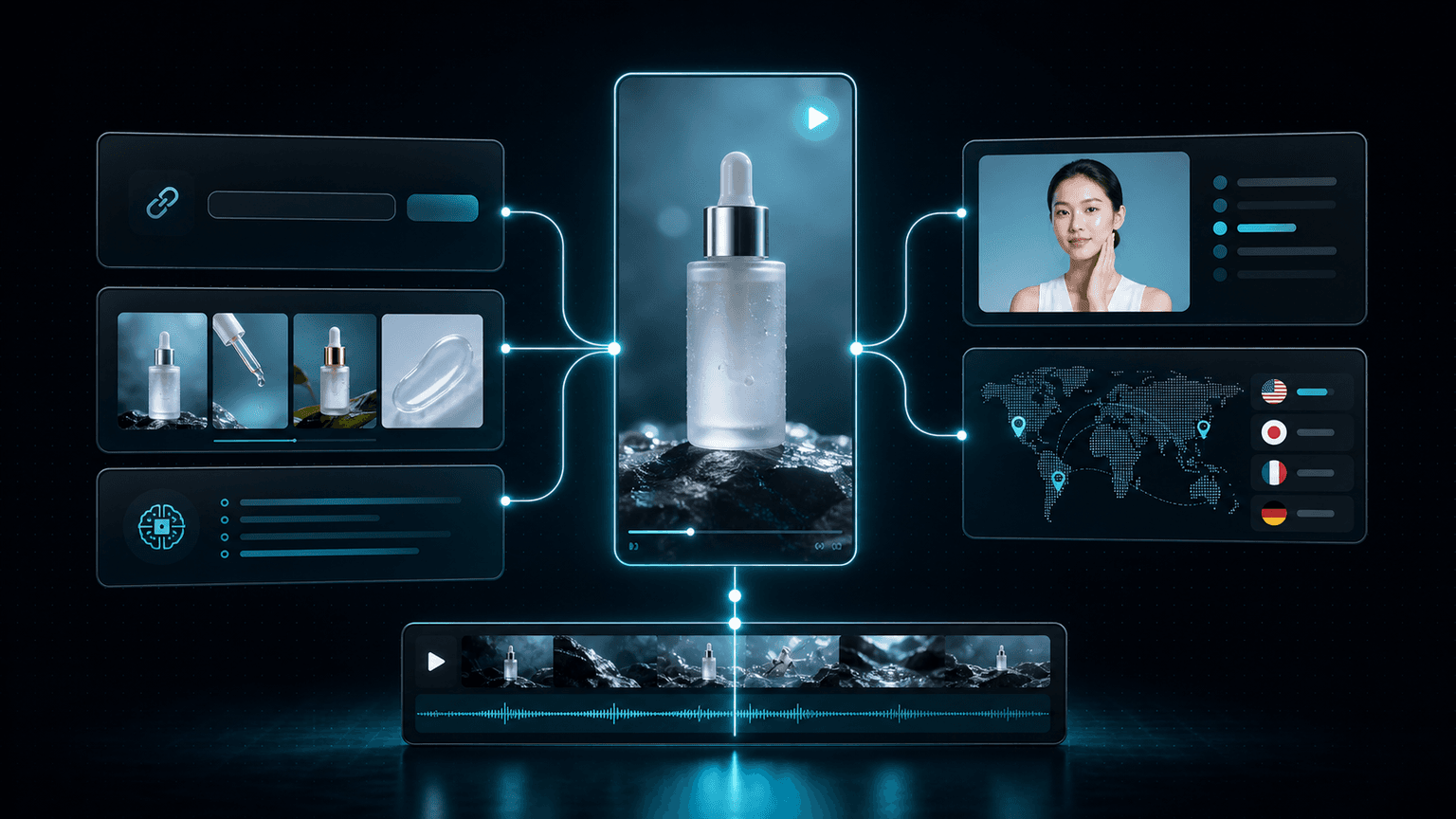
The strongest choice is not the tool with the flashiest demo. It is the system that can turn your real product inputs into usable ads, then support review, revision, localization, and repeated production.
AI video ad generators now make similar promises: paste a product URL, choose a style, and receive an ad. That is useful, but it only describes the first generation step. Real ecommerce production includes inaccurate product details, weak openings, mismatched visuals, market-specific versions, feedback from several people, and the need to produce again next week.
This comparison therefore looks beyond whether a tool can produce one attractive demo. It asks what inputs the system accepts, how much control remains after generation, whether avatar and localization workflows are practical, and whether production can extend into automation.
The right answer still depends on the team. A solo seller testing a few concepts does not need exactly the same workflow as a brand, agency, or cross-border team producing for several products and markets.
At a glance
- HiLight: broad ecommerce inputs, complete ad generation, scene-level refinement, Multi-Agent creation, and external agent workflows.
- Topview: a direct product-URL-to-video workflow with ecommerce-oriented templates and avatars.
- Creatify: fast URL-to-ad creation and convenient creative variation for performance marketing.
- JoggAI: product URL workflows combined with avatar-led video creation and localization.
- HeyGen: a strong choice when polished avatar presentation and multilingual communication are the main priorities.
How We Compared the Tools
A feature list can make every platform look nearly identical. The more useful question is how each tool behaves across a complete production cycle.
We focused on six criteria: ecommerce input support, quality of the first complete draft, editing control, avatar and localization capability, workflow automation, and suitability for repeated team production.
The practical questions behind the comparison
- Can the tool start from a product URL as well as images, clips, scripts, documents, or a short brief?
- Does it create only isolated assets, or can it assemble a complete ad direction?
- Can teams fix one scene without rebuilding work that has already been approved?
- Can the same product be adapted for different languages, markets, presenters, and formats?
- Can the workflow be triggered or managed outside the editor when production volume increases?
Quick Comparison: Five AI Video Ad Generators
The table below summarizes the clearest differences. Product capabilities and plans change, so teams should verify current limits before making a purchasing decision.
| Tool | Best fit | Product inputs | Post-generation control | Automation direction |
|---|---|---|---|---|
| HiLight | Ecommerce teams that need an end-to-end production system | Product URLs, images, clips, scripts, documents, briefs, and avatars | Fine-tune scripts, visuals, subtitles, voice, and individual scenes | Multi-Agent creation plus Hilight Skill for OpenClaw and Claude Code |
| Topview | Sellers prioritizing a direct URL-to-video workflow | Product URL and common product assets | Template- and workflow-based adjustment | API and batch-oriented capabilities vary by plan |
| Creatify | Performance teams creating fast ad variations | Product URL, media assets, and creative inputs | Edit generated ads and produce variants | API and scaled creative workflows |
| JoggAI | Teams combining ecommerce ads with avatar presenters | Product URL, assets, scripts, and avatars | Avatar, script, language, and scene adjustments | API-oriented production options |
| HeyGen | Presenter-led and multilingual brand communication | Scripts, media, avatars, and templates | Strong avatar, voice, translation, and layout control | API and enterprise workflow integrations |
1. HiLight: From Product Material to a Repeatable Ad Workflow
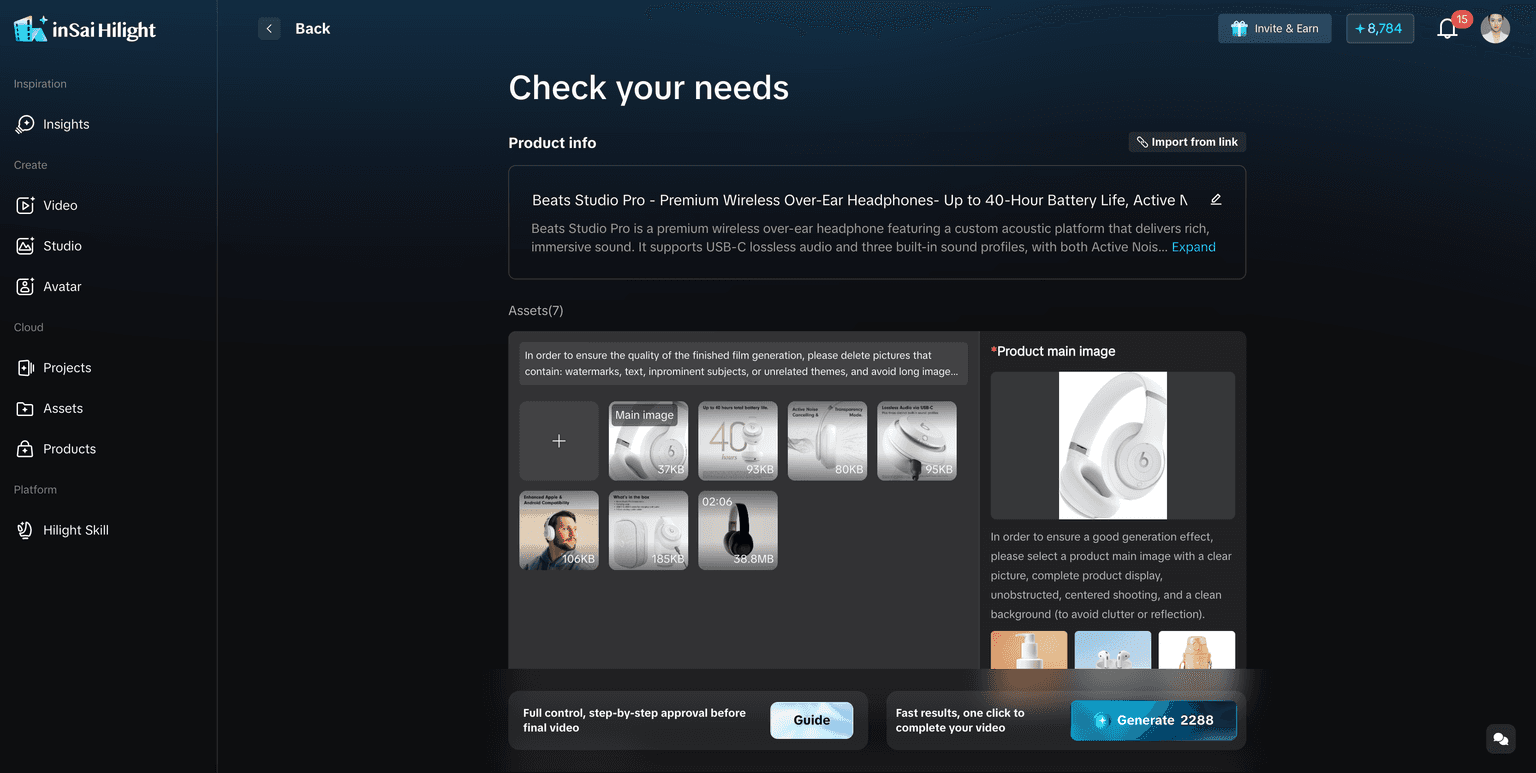
HiLight covers the familiar product-link-to-video workflow, but it is not limited to that entry point. Teams can also begin with product images, existing clips, documents, reference scripts, a short requirement, or digital avatars. This matters when a marketplace page is incomplete, when a new product does not yet have a public URL, or when the creative idea starts from internal material.
Smart Video helps assemble those inputs into a complete draft. Multi-Agent generation coordinates product analysis, selling-point extraction, script development, visual matching, and voiceover as connected tasks. The practical advantage is not simply that several AI models are involved; it is that the system is designed around the sequence required to build an ecommerce video.
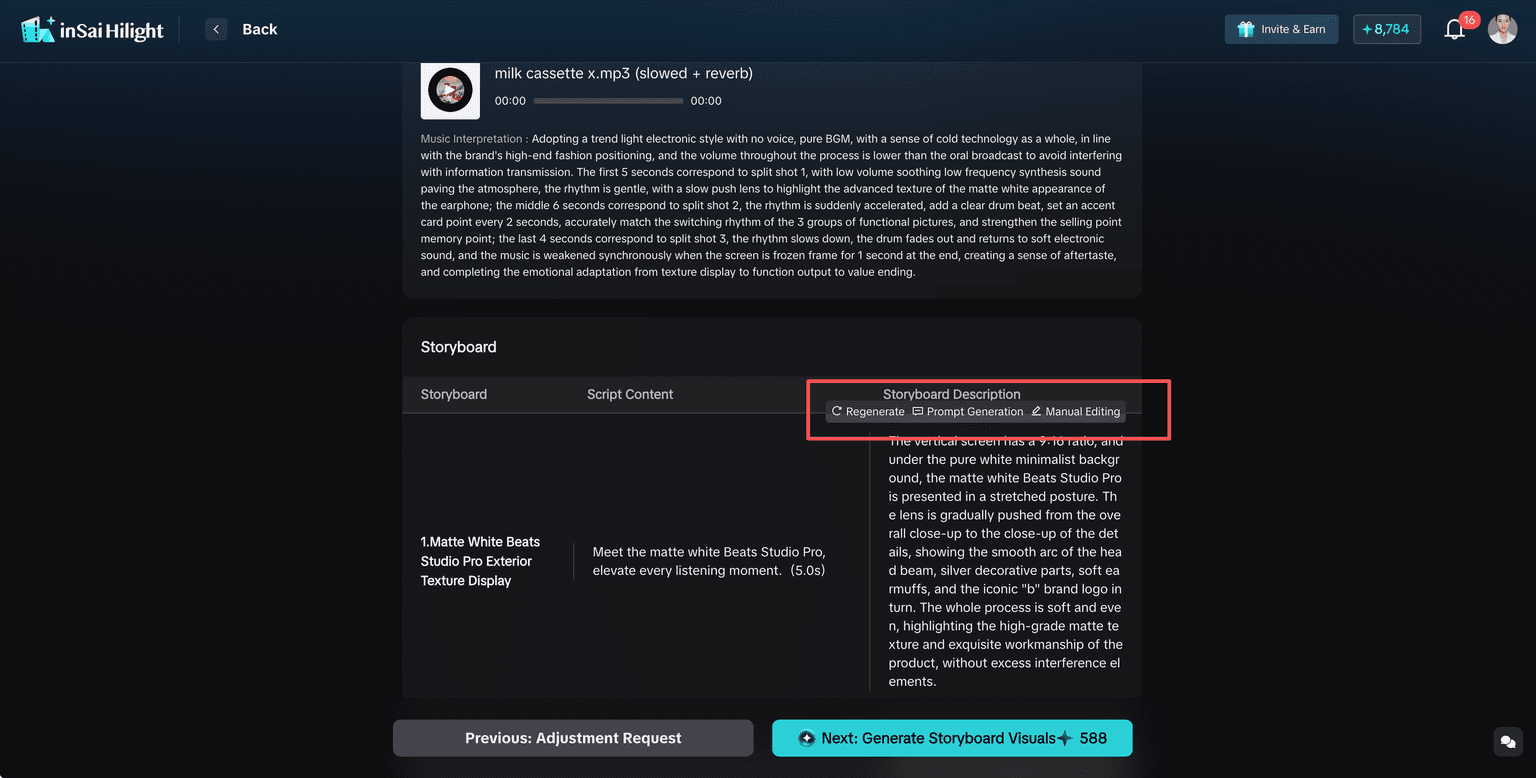
After generation, Fine-tune Mode lets teams retain the approved direction while adjusting scripts, visuals, subtitles, voice, or individual scenes. That addresses a common production problem: the opening may need to change even though the product demonstration is already accurate.
Where HiLight stands out
- Multiple starting points beyond a product URL
- Dedicated scenarios for product videos, native ads, demonstrations, promotions, and avatar-led content
- A Multi-Agent workflow that connects analysis, scripting, visuals, and voiceover
- Scene-level refinement instead of forcing a full regeneration
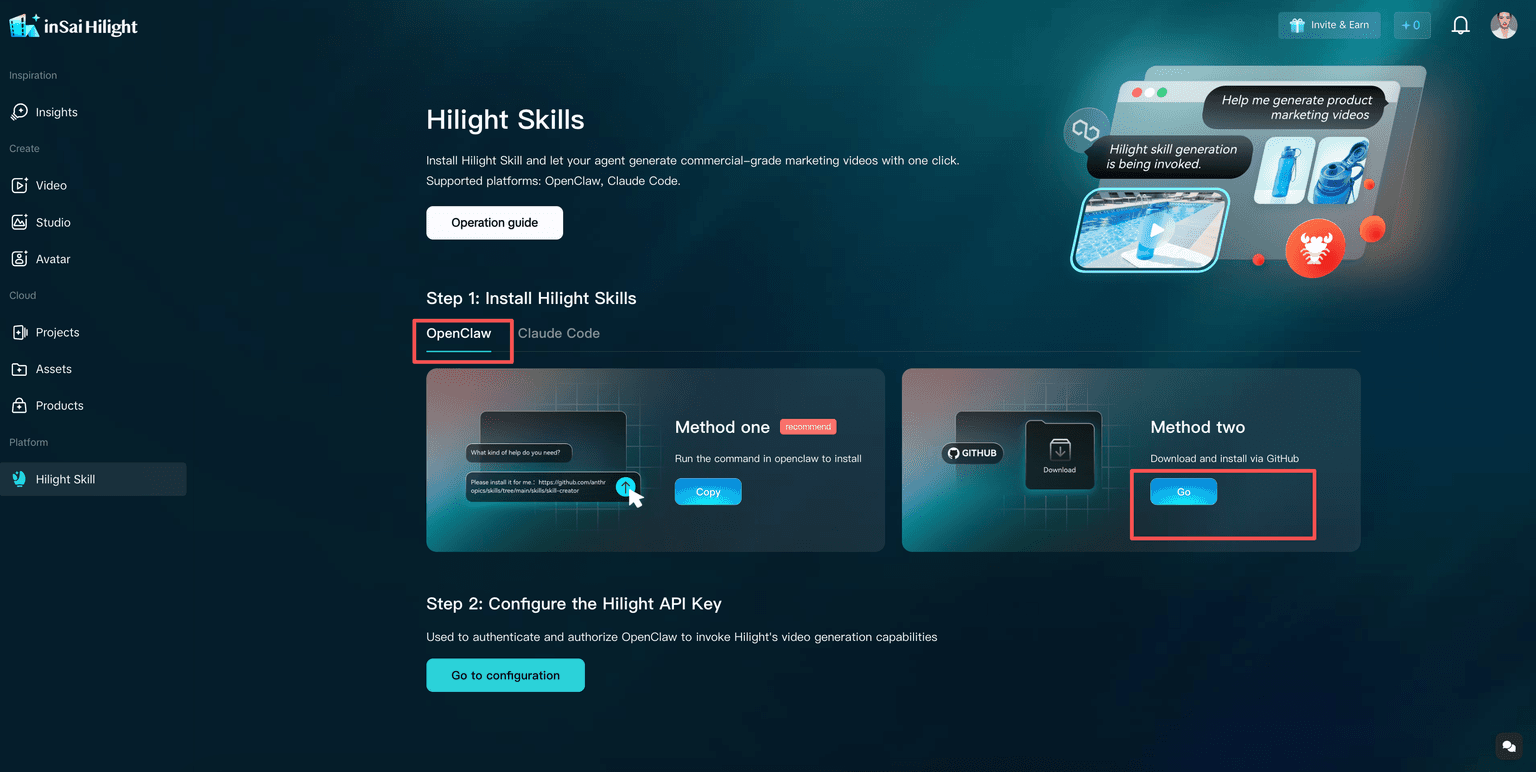
- Hilight Skill for calling generation from OpenClaw or Claude Code
For teams that need to make one ad quickly and continue producing across products, markets, and formats, this combination provides a broader path than a single URL-to-video generator.
2. Topview: Direct URL-to-Video Production
Topview is positioned around turning product pages into promotional videos with ecommerce templates, AI presenters, and generated marketing content. Its direct workflow is easy to understand for sellers who already have a complete product page and want to move quickly from listing information to a usable creative draft.
It is a sensible option when the URL is the main source of truth and the team prefers a guided, template-oriented process. Before scaling, verify how much scene-level control, collaboration, localization, and batch production are available in the plan being considered.
Best suited to
- Sellers with complete product pages
- Fast template-based product videos
- Teams that value a simple URL-first workflow
3. Creatify: Fast Creative Variations for Paid Ads
Creatify focuses strongly on performance advertising. Product URLs can become short ads, and teams can test different scripts, presenters, and creative directions without organizing a traditional shoot for every variation.
This makes it attractive for marketers who need more concepts for paid campaigns. The key evaluation point is what happens after those concepts are generated: whether the editing depth, brand controls, collaboration process, and output limits match the team’s review cycle.
Best suited to
- Rapid ad concept generation
- Performance marketers testing several creative angles
- Teams whose main objective is paid social variation
4. JoggAI: Ecommerce Ads with Avatar-Led Delivery
JoggAI combines product URL workflows with AI avatars, scripts, and multilingual video creation. It is relevant for sellers that want the product explained by an on-screen presenter without filming a spokesperson for every market or campaign.
Its appeal is strongest when avatar delivery is central to the format. Teams should compare how product accuracy, scene composition, local editing, brand consistency, and scaled production fit their own catalogue and approval process.
Best suited to
- Avatar-led product explanation
- Multilingual product content
- Sellers mixing URL-to-video and presenter formats
5. HeyGen: Polished Avatars and Multilingual Communication
HeyGen is widely used for avatar video, translation, and presenter-led communication. It can support product marketing, especially when a spokesperson, localized voice, or multilingual version is more important than automatic ecommerce product analysis.
For brand explainers, onboarding, social communication, and market localization, its avatar ecosystem is a major strength. For catalogue-scale ad production, teams should assess how much product extraction, selling-point development, ad-specific structure, and scene assembly must be handled outside the platform.
Best suited to
- High-quality avatar presentation
- Video translation and localization
- Presenter-led brand and product communication
Templates, Multi-Agent Systems, and External Agent Workflows
These terms describe different layers of automation and should not be treated as interchangeable.
A template automates layout and assembly. A Multi-Agent system divides the creative process into coordinated tasks such as analyzing a product, selecting benefits, writing a script, matching visuals, and generating voiceover. An external agent workflow allows another working environment to trigger and monitor video generation.
| Automation layer | What it handles | HiLight example |
|---|---|---|
| Template or scenario | Provides a defined format and creative structure | TikTok product video, AI native ad, product demo, promotional ad |
| Multi-Agent generation | Coordinates specialized tasks inside the creation process | Product analysis, selling points, script, visuals, and voiceover |
| External agent call | Starts and manages generation from another agent environment | Hilight Skill in OpenClaw or Claude Code |
| API or scaled workflow | Connects production to internal systems and repeated tasks | Useful when catalogue volume and operational integration increase |
Which Tool Should Your Team Choose?
Choose from the bottleneck your team actually has. If the problem is slow concept generation, prioritize speed and variation. If it is localization, prioritize avatar, voice, and translation quality. If it is repeated ecommerce production, examine inputs, full-draft quality, revision control, and automation together.
HiLight is the stronger fit when the team wants product-link generation and a wider system around it: multiple asset inputs, complete ad assembly, Multi-Agent creation, scene-level refinement, and external agent calls. Topview and Creatify are worth considering for direct URL-first or performance-ad workflows. JoggAI and HeyGen become especially relevant when avatar presentation is central.
Match the tool to the workflow
- Solo seller: prioritize ease of use, output limits, and a direct path from product information to a complete draft.
- Performance team: prioritize creative variation, testing speed, and the ability to revise hooks without losing useful scenes.
- Cross-border brand: prioritize localization, product accuracy, reusable assets, and control across markets.
- Agency or multi-store team: prioritize collaboration, repeatable workflows, batch capacity, and automation.
FAQ
HiLight, Topview, Creatify, and JoggAI explicitly support ecommerce URL-based workflows. HeyGen can create product marketing videos, but its strongest workflows center on scripts, avatars, translation, and presenter-led content. Always verify current URL support and plan limits.
It is a useful starting point, but teams also need accurate inputs, review controls, localization, version management, and a practical way to revise weak scenes.
Multi-Agent coordinates specialized tasks inside HiLight generation. Hilight Skill lets supported external agents such as OpenClaw or Claude Code call the video generation workflow.
HeyGen is particularly strong for polished avatar and multilingual presenter workflows. JoggAI also combines avatars with ecommerce creation. HiLight includes avatar video within a broader ecommerce production system.
No. Conversion depends on the product, offer, audience, creative angle, media buying, landing page, and testing. The tool improves production speed and creative capacity, not guaranteed performance.
Conclusion
The best AI video ad generator is not determined by one feature. Product URL generation is now an important baseline, but ecommerce teams should also compare what happens before and after the first draft.
HiLight’s advantage is the breadth of the connected workflow: product links and other assets can become complete ads, Multi-Agent generation handles linked creative tasks, Fine-tune Mode supports local revision, and Hilight Skill extends creation into external agent environments. That combination is especially relevant for teams moving from occasional experiments to repeatable production.
Whichever platform you choose, test it with your real products, languages, review process, and output volume. A polished demo is encouraging; a workflow your team can repeat is what creates lasting value.

