Quick Answer
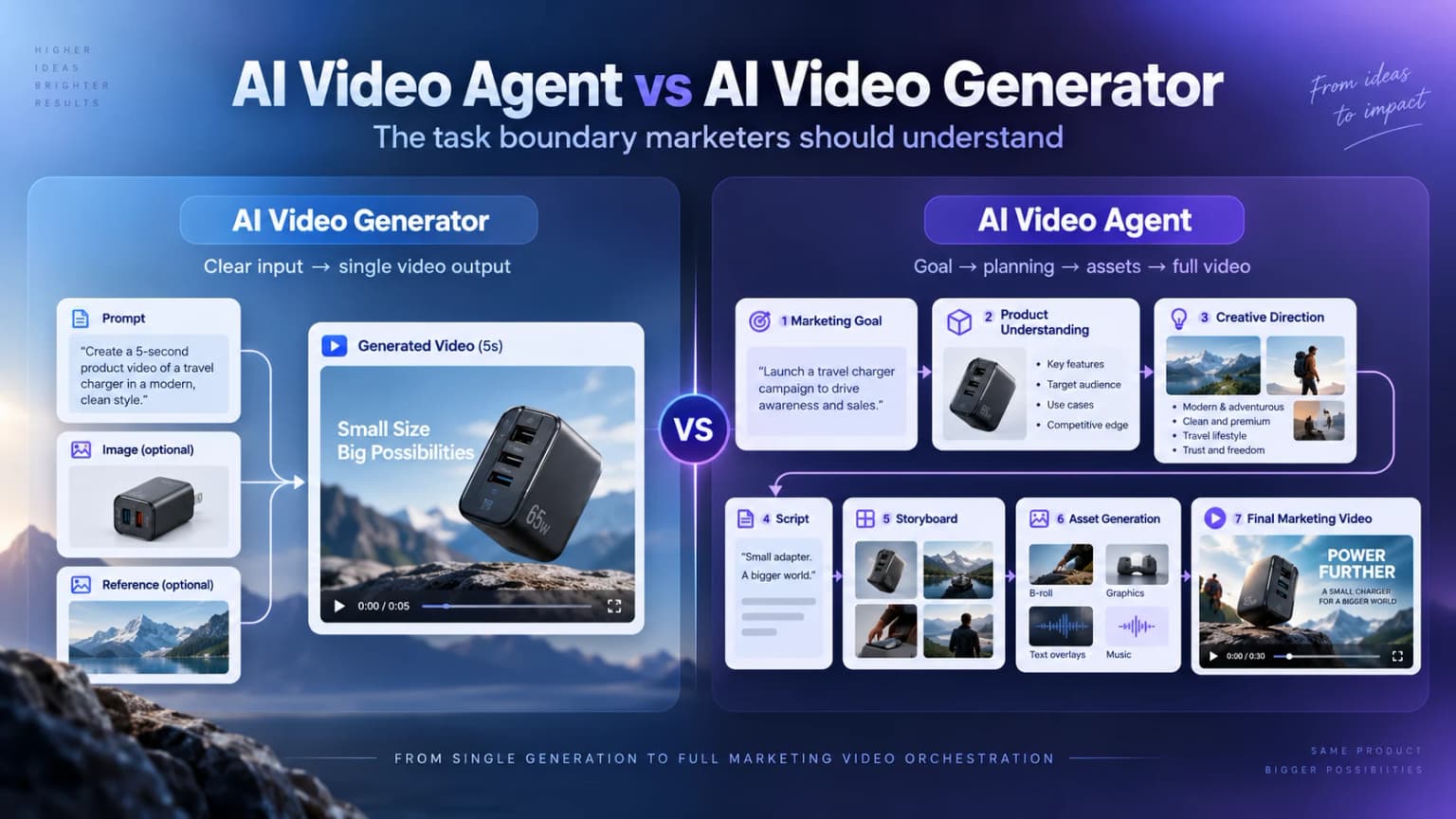
An AI video generator creates video from instructions. An AI video agent works toward a goal.
A generator typically waits for you to define the prompt, scene, style, or output. A video Agent can interpret a marketing goal, plan the content, organize available assets, generate the required scenes, and help move the task toward a finished video. The distinction is not “old AI versus new AI.” It is a different boundary of responsibility.
What Is an AI Video Generator?
An AI video generator turns a defined input into video content:
Prompt, image, or reference → AI video generation → video clip
For example, upload a product image of a sneaker and ask the model to show it moving through a city-street scene. The result is a visual asset that can become one shot in a campaign.
The generator does not need to understand the entire campaign to do that job well. It needs a clear creation request and enough reference material to produce the requested result.
What video generators are good at
Video generators are not outdated. A focused AI product video generator or AI video generator for marketing is often the more direct choice when you:
- already know the exact shot you need;
- want to explore a visual style or camera movement;
- need one close-up, transition, B-roll clip, or image-to-video asset;
- already have a script and storyboard; or
- want precise control over one generation.
The user supplies the production logic; the generator supplies a focused creation capability. That division of work is valuable when the plan is already settled.
What Is an AI Video Agent?
An AI video Agent starts from a broader assignment. Imagine telling a system:
> Create a TikTok product video for this travel charger focused on conversion.
A generator still needs more instructions: What is the hook? Which benefit comes first? What should each scene show? What voiceover and call to action should be used?
An Agent is expected to help decide the supported next steps. In a product-video task, that may look like:
Marketing goal → product understanding → creative direction → script → storyboard → assets → generation → finished video
The product and the goal anchor the task. The Agent can determine how the message should be organized, what content is required, and which generation capabilities should be used. The marketer reviews and redirects those decisions instead of specifying every scene from scratch.
This does not mean unlimited autonomy. An Agent works within the information, capabilities, permissions, and review points built into the product. What makes the experience Agent-like is that the system can carry part of the planning responsibility between the initial goal and the final result.
AI Video Agent vs AI Video Generator: The Key Differences
The clearest comparison is not a feature count. It is the responsibility each system accepts.
These are common patterns, not universal product specifications. Some generators offer scripting and assembly; some Agents pause for approval at each stage. The central distinction still holds:
The biggest difference is not how the video is generated. It is who carries the planning workload.
The Difference Becomes Clear When the Marketing Goal Changes
Consider the same travel charger under two different goals.
For a conversion video, the content needs to move quickly from a recognizable problem to a buying reason:
Problem → product solution → key benefit → proof or use → call to action
A possible hook is: “Stop packing three chargers for every trip.” The video can then show how one charger replaces several devices and close with a direct next step.
For a product-awareness video, the message needs a different shape:
Product positioning → lifestyle context → experience → brand memory
A possible opening is: “One charger designed to simplify everything you carry.” The product is still the same, but the video gives more space to positioning and the travel experience than to an immediate purchase prompt.
In a generator-led process, the marketer usually develops both concepts, writes two sets of prompts, and organizes the resulting clips. In an Agent-led process, changing the marketing goal can trigger a new content plan: a different hook, emphasis, scene order, and call to action.
That is more than resizing one video or swapping a final line. Hilight's guide to choosing between product awareness and conversion explores how the same product requires a different message when the objective changes.
When Should Marketers Use a Video Generator?
Choose a video generator when the work is already well defined.
- You have a clear shot: “Show a model walking toward the camera while holding this skincare bottle.”
- You need one asset: a product close-up, transition, B-roll clip, image-to-video result, or specific camera movement.
- You have a complete production plan: the script, storyboard, creative direction, and edit structure are already decided.
In these cases, another planning layer may add overhead. A focused generator lets the creator direct the exact output and iterate on the part that matters.
Hilight reflects this boundary inside its product. AI Studio handles defined asset tasks such as video creation, product close-ups, B-roll, presenter clips, and image work. Those assets can stand alone or support a larger campaign. Smart Video fits the point where the task needs a complete script, scene sequence, and marketing video rather than one isolated asset.
When Does an AI Video Agent Make More Sense?
An Agent becomes more useful when the desired outcome is clearer than the production plan.
You have a product, but not a finished creative plan
You may already have a product URL, product images, and a basic goal, but no script, storyboard, or shot list. The useful next step is not another blank prompt box. It is a system that can understand the product, propose how the message should work, and carry that direction into production.
You need different videos for different marketing goals
The same SKU may need a conversion video, product-awareness video, promotion, or demonstration. These are not merely format variants. Each goal can change the opening, the proof, the amount of explanation, the scene order, and the call to action.
You do not want to manage every generation step
The assignment you want to give is not “generate scene one,” followed by “generate scene two.” It is closer to: “Here is the product and the marketing goal. Help me make the complete video.”
An AI video Agent makes sense when you want the system to connect those steps while you steer the business and creative boundaries.
What an AI Video Agent Still Shouldn't Decide for You
More planning responsibility does not remove marketing judgment. An Agent can support content planning, selling-point organization, creative direction, scripting, storyboarding, asset coordination, and generation. The marketer still owns four decisions:
- Business goal: whether the video should build awareness, explain the product, promote an offer, or drive conversion.
- Product truth: which features, prices, demonstrations, and claims are accurate.
- Brand boundaries: what the brand can say, how it should look, and which materials it has the right to use.
- Final judgment: whether the result fits the campaign and is ready for its intended channel.
An Agent reduces execution and planning work; it does not remove marketing judgment.
From Generator to Agent: What Video Creation Looks Like in Hilight
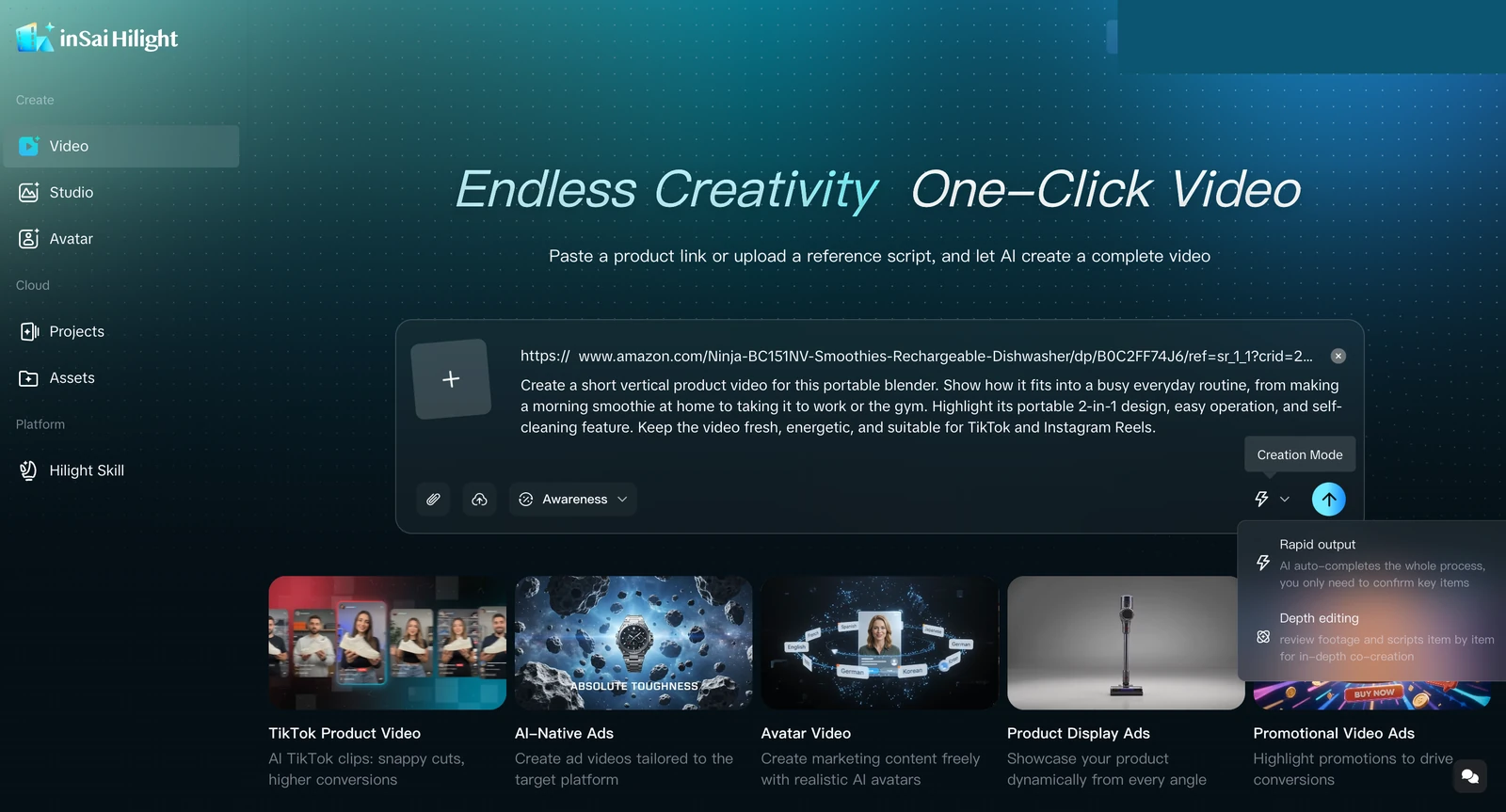
Hilight is an AI marketing Agent for ecommerce content creation. Smart Video makes the category difference concrete by connecting the product, goal, creative decisions, and production inside one task.
Start with the product
Provide an accessible product link, product information, product images, existing clips, a reference script, or a creative request—whatever useful material is already available.
Tell Hilight the marketing goal
State what the video should achieve, along with important audience, platform, language, or brand constraints.
Review the creative direction
Hilight uses the product context and goal to develop the message, selling-point emphasis, and creative direction. The marketer corrects product facts and redirects the idea when needed.
Move from idea to script and storyboard
The marketing direction becomes a script and scene plan that can be reviewed before the final video is produced.
Generate the assets and finished video
The task continues through the required visual and production work toward one complete product video, rather than ending with an isolated clip.
These stages describe the responsibility Hilight takes on, not a requirement to prepare every item in advance. Smart Video currently offers Quick Creation for a faster complete first version and Deep Co-Creation when the creative direction, brand requirements, or content details need more involvement.
For a deeper look at the product architecture behind these stages, read Inside Hilight's Multi-Agent Workflow. That article explains product-information modeling, multi-Agent collaboration, asset handling, and review in more detail; the practical point here is simpler: Hilight uses those capabilities to move one marketing goal toward a complete video.

